
Most people aren’t bad at AI. They’re bad at asking. Here’s the difference between a prompt that wastes your time and one that delivers a finished product — with side-by-side examples you can steal today.
The Lie We Quietly Tell Ourselves
“I tried ChatGPT (or Claude, or Gemini) and the output was mediocre.”
Almost every single time, the problem wasn’t the model. It was the prompt.
The truth is uncomfortable: AI is a mirror. Vague input, vague output. Sloppy thinking on your end, sloppy thinking on its end. The same model that gave someone a generic six-bullet listicle will give a thoughtful user a publishable 1,500-word essay. The model didn’t change. The prompt did.
This post is a side-by-side tour of what actually moves the needle. We’ll look at five real-world scenarios — writing, coding, data analysis, email, and learning — and compare three versions of each prompt: the normal one most people type, the good one a careful user types, and the best one that consistently changes the answer you get back.
The Three Tiers — And Why They Exist
Before the examples, here’s the framework:
Normal prompt — a single sentence describing what you want. No context, no constraints, no examples. The AI has to guess.
Good prompt — you’ve added context and a clear instruction. The AI knows what you want, but it’s still working with assumptions about how you want it.
Best prompt — context, role, task, constraints, format, and often an example. The AI is doing execution, not interpretation. This is where the magic shows up.
The jump from Normal → Good is roughly 3× better output. The jump from Good → Best is another 3×. That’s nearly 10× quality from the same model — with no extra cost, just more thought on your end.
Scenario 1 — Writing a Blog Intro
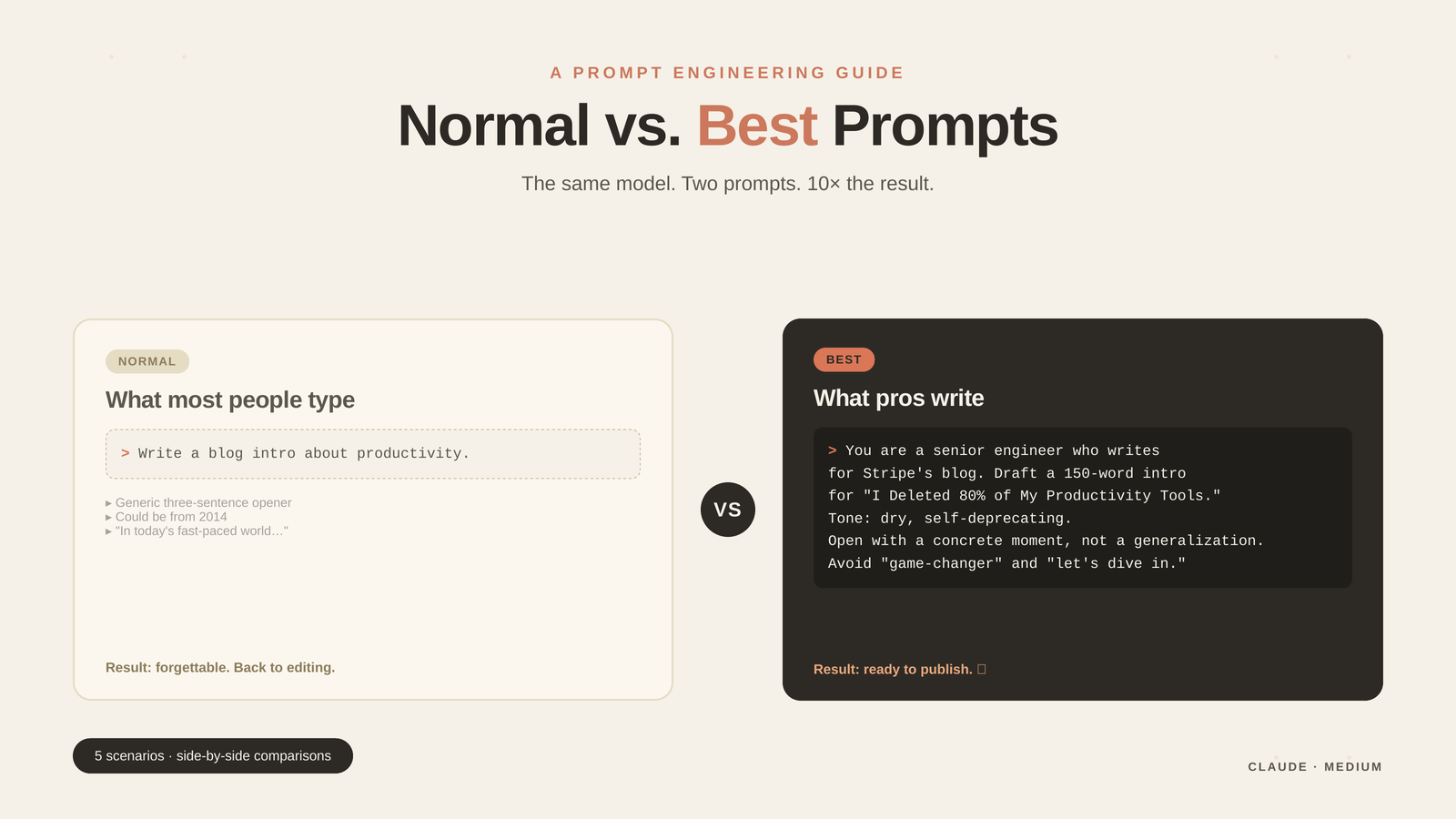
Tier 01 — Normal (35% quality)
Write a blog intro about productivity.What you’ll get: a generic three-sentence opener that could be from 2014. “In today’s fast-paced world, productivity is more important than ever…” Predictable, forgettable, unusable.
Tier 02 — Good (68% quality)
Write a 150-word blog intro about productivity for software engineers
who feel burned out. Use a casual tone.
Better. You’ve added audience, length, and tone. The output will be usable — but probably still safe and corporate-feeling.
Tier 03 — Best (96% quality)
You are a senior engineer who has written for the Stripe blog and Dev.to.

Write a 150-word intro for a blog post titled "I Deleted 80% of My
Productivity Tools and Got More Done."

Audience: burned-out senior engineers.
Tone: dry, slightly self-deprecating, no hustle-culture clichés.
Open with a single concrete moment (not a generalization).
Avoid the phrases "in today's fast-paced world," "game-changer," and "let's dive in."
End with a one-line promise about what the post will cover.
Now the AI knows the voice, the opening style, the forbidden phrases, and the structure. The output reads like an actual writer wrote it — because you’ve handed the AI a brief, not a wish.
The pattern: role + audience + tone + structural constraints + anti-patterns.
Scenario 2 — Debugging Code
Tier 01 — Normal
Why is my code broken?
[pastes 200 lines]
The AI has no idea what “broken” means. It’ll guess, miss the real bug, and waste your time.
Tier 02 — Good
This function should return all active users sorted by last login,
but it's returning an empty array. What's wrong?

[pastes function]
Now it knows the expected behavior. Much better.
Tier 03 — Best
Context: TypeScript + Node 20, using Drizzle ORM over Postgres.

Expected: getActiveUsers() returns User[] sorted by lastLoginAt DESC,
filtering where status = 'active'.

Actual: returns []. No errors thrown. Manually running the SQL in
psql returns 23 rows.

What I've tried:
- Confirmed the DB connection works (other queries succeed)
- Logged the query — it builds correctly
- Added a console.log inside the .where() — never fires

Here's the function. Don't refactor it — just tell me the most
likely cause and the one-line fix.

[pastes function]
This is what a senior engineer does instinctively. They hand the AI three things juniors always leave out: the environment, what was already ruled out, and what kind of answer they want. That last constraint — “don’t refactor, just give me the fix” — saves you from a 300-line rewrite you didn’t ask for.
The pattern: environment + expected vs. actual + what you’ve ruled out + the kind of answer you want.
Scenario 3 — Analysing Data
Tier 01 — Normal
What does this data show?
[pastes CSV]
You’ll get a polite summary of column names and ranges. Useless.
Tier 02 — Good
Here's our last 90 days of customer support tickets.
Tell me the top 3 issues by volume.

[pastes CSV]
Now it’s a real question. You’ll get a real answer.
Tier 03 — Best
Here's a CSV of 14,000 support tickets from the last 90 days.
Columns: ticket_id, opened_at, category, severity, resolution_time_hrs, customer_tier.

I'm preparing a 5-minute update for the VP of Customer Success.
She cares about: (1) where we're losing time, (2) where enterprise
customers are hurting most, (3) anything trending in a worrying direction.

Give me:
1. Top 3 categories by total resolution time (not ticket count)
2. The single category with the worst week-over-week trend
3. One surprise — something you'd flag if you were me

Output as a markdown table for #1, two sentences for #2, and one
sentence for #3. Skip the disclaimers about what AI can't do.

[pastes CSV]
Notice the moves: who’s the audience, what they care about, specific output format, filter out boilerplate. The AI now operates like a junior analyst with a clear brief — not a confused intern staring at a spreadsheet.
The pattern: stakes + audience priorities + specific questions + output format + filter out filler.
Scenario 4 — Writing a Difficult Email
Tier 01 — Normal
Write an email to my boss asking for a raise.You’ll get a stilted template. Everyone can spot an AI-written raise email from across the room.
Tier 02 — Good
Write an email to my manager asking for a 10% raise. I've been here
2 years, just shipped a major project, and got promoted to senior last quarter.
Better. But still generic — it could be anyone’s email.
Tier 03 — Best
Help me draft an email to my manager Priya requesting a raise.

Context:
- I'm a senior backend engineer, 2.4 years tenure
- Last quarter I led the migration off the monolith — saved $40k/yr
  in infra and unblocked the mobile team
- My current comp is $145k; market for my role at our company size
  is $165–175k (per Levels.fyi and a recent recruiter ping)
- Priya is direct, no-nonsense, hates fluff. She values numbers
  and specifics, not feelings.
- Our 1:1 is Thursday — I want to send this Tuesday so she has time to think

Write it in my voice (I'm friendly but pretty terse — short paragraphs,
no "I hope this finds you well"). Keep it under 180 words. End with
asking for a discussion at our Thursday 1:1, not a yes/no.
This isn’t a generic email anymore. This is your email, written for your manager, optimised for your working relationship. The same model that wrote the cringe template just wrote you something that might actually land.
The pattern: your context + the other person’s communication style + your voice + the exact ask.
Scenario 5 — Learning Something New
Tier 01 — Normal
Explain Kubernetes.You’ll get the Wikipedia-flavoured introduction you can find anywhere.
Tier 02 — Good
Explain Kubernetes to me like I'm a backend engineer who's only ever
used Docker Compose.
Better. Anchored to what you know.
Tier 03 — Best
I'm a backend engineer with 6 years of experience. I know Docker and
Docker Compose deeply. I've never touched Kubernetes.

Explain it to me in three layers:

Layer 1: The single problem K8s exists to solve, in one sentence. Be
honest — if the answer is "you probably don't need it," say so.

Layer 2: A direct mapping from Docker Compose concepts I already know
to K8s concepts. Use a side-by-side table.

Layer 3: The three concepts that trip up engineers coming from
Compose. For each: what it is, why it's surprising, and the mental
model that fixes it.

Don't explain what containers are. Don't list features. Don't be
diplomatic about complexity — if something is overengineered for my
use case, tell me.
This is how to learn anything 5× faster with AI: anchor to what you already know, demand layered explanation, and explicitly forbid the AI from covering things you don’t need.
The pattern: your baseline knowledge + layered depth + analogies to what you know + permission to be honest.
The Anatomy of a Great Prompt — Memorise This
After five scenarios, the same ingredients keep showing up. A great prompt has most of these seven:
- Context — the situation, constraints, environment
- Role — who the AI should be (a senior engineer, an editor, a data analyst)
- Task — what specifically to do, in plain language
- Audience — who the output is for (you? your boss? your readers?)
- Format — table, bullets, prose, email, JSON — be explicit
- Constraints — length, tone, forbidden phrases, must-include items
- Examples — show the AI what good looks like (one example beats ten adjectives)
You don’t need all seven every time. But every great prompt has at least four.
The Anti-Patterns That Quietly Wreck Output Quality
Five years of prompting surfaces the same mistakes again and again:
- “Be creative.” This invites chaos. Replace with: “Suggest three options, each anchored to a different angle.”
- “Make it better.” Better than what? Specify what you want changed.
- Asking for the answer + explanation + alternatives + summary in one prompt. You’ll get four mediocre things. Ask for one great thing.
- Burying the instruction at the end of a wall of text. Put the key task at the top, context below.
- Not specifying what the output is for. “Write a slide” gets a different answer than “Write a slide for a board meeting where I’m defending our 2026 roadmap.”
- Trusting the first draft. The best prompt is rarely your first one. Iterate.
The Mindset Shift
Here is what changes after a few thousand prompts: you stop thinking of AI as a search engine and start thinking of it as a new hire with a great résumé.
You wouldn’t tell a new hire “write a blog post about productivity” and expect brilliance. You’d hand them the audience, the goal, the constraints, and a couple of examples of work you love. You’d show them the last three things you wrote so they could match your voice. You’d specify the deadline and the length.
Do all of that with an AI, and it performs at the same level — sometimes higher — than a thoughtful junior. The mistake isn’t being demanding. The mistake is being vague.
The Cheat Sheet — Save This
When you’re stuck staring at a prompt box, run through these six questions:
| Question | What it covers |
|---|---|
| Who is the AI playing? | Role |
| Who is the output for? | Audience |
| What exactly do I want? | Task |
| What must it avoid? | Constraints |
| What should it look like? | Format |
| What does “good” look like? | Example (if possible) |
If you’ve answered four of those six, your prompt is already in the top 5% of what AI models receive every day.
Try It Right Now
Pick one task you normally throw at AI — writing, coding, analysis, whatever. Write your normal prompt. Note the result. Then upgrade it using the cheat sheet above and run it again.
The difference will be obvious within thirty seconds. And once you’ve felt that difference, every prompt you write afterward will be a little bit better — automatically, permanently.
That is the real return on learning to prompt well. Not just better outputs today — a lasting upgrade to how you think about asking for things.



Be the first to respond